;
This means that candidates can
now monitor their admission status and easily know when they have been offered
an admission.
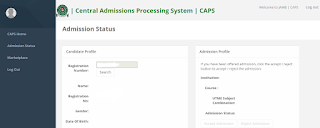 |
| JAMB CAPS Admission Portal |
Once a candidate has been
offered admission, such candidate is required to do either of two things; to
accept the admission or to reject it.
Once you accept the admission,
your admission quest is over as you will no longer be available for other
schools' admission consideration. On the other hand, if you reject the
admission, you become available to other schools who have free admission slots
for admission consideration.
It is important to note also
that candidates who have been offered admission on JAMB CAPS are to equally
print their admission letter after accepting the admission, as they will likely
need this during clearance and registration in the school that they have been
admitted.
We therefore advise candidates
to closely monitor their admission status on JAMB CAPS so as to do the needful
as soon as possible.
Some schools may not even
publish list of admitted candidates on their own portal or notice board. So for
candidates that applied for admission in such schools, the only way to know
when they have been offered admission is to check their admission status on
JAMB CAPS.
See also:
How
To Check Admission Status on JAMB CAPS
·
After
you have log in you will see a welcome notice just move down on the page you
will see "Check Admission Status". Click on it
and you will be redirected to the caps page
·
After
clicking on "Check Admission Status", you will
see a page showing your JAMB details and your admission status, If you have
been given admission, you can now go ahead to accept it or reject it.
·
Note:
If you are using a phone, you may not see the option to check is Admission
Status on CAPS, Most phone users may only see the welcome message. The caps
page shows only welcome because it requires you to use desktop mode to view the
complete page. This is why the chrome
browser is recommended if you are a using a phone. All you need to do is go to
Chrome option and choose request desktop site for the complete page to display.



.jpeg)
.jpeg)
Comments
Post a Comment
Disclaimer: All comments on this blog are the thought and opinion of blog readers, We will not in anyway be liable for them. Thank you.